My expectations of deployment probably still come from deploying PHP. You opened the files, changed them, pushed them to the server with FileZilla, and Apache ran them. I still think of deployment as copying application files to a server that runs them. I have tried a few ways to deploy Rails since then. Some were simple, and some gave me more control. I think I was always trying to get a bit of both. With BoringCache, I have ended up close to that old model again: I build the Rails app in a container, take the filesystem out, and send the same finished artifact to four Ubuntu servers.
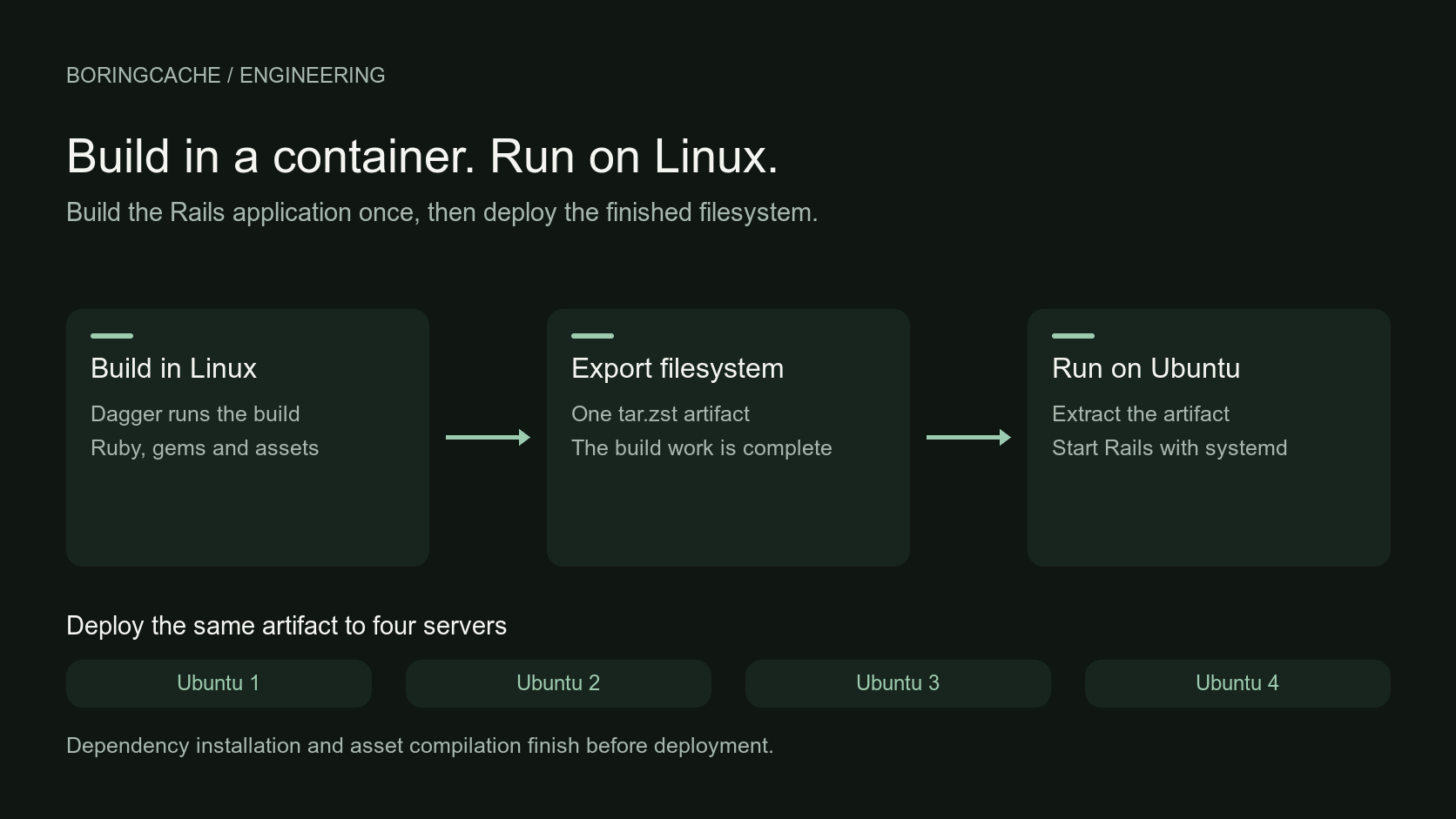
The deployment path
Heroku was easy to use because you could push the repository and it ran. The buildpack worked out most of the rest. Capistrano used SSH, release directories and symlinks to deploy directly to the server. For one project I also used my fork of Cuber, a Ruby tool that packaged and deployed the app to Kubernetes. While building Chuspace, I used Tomo. I liked it. Its Ruby interface felt familiar, the plugin model was simple, and deployment used commands I already understood. I later moved Chuspace to Docker builds. This was before Kamal existed, but the useful part was the same: build one thing and send that same thing to every server.
Kamal made building and deploying the same image easier for Rails, and I used it for the first BoringCache deployments. I found it harder to diagnose failures across the virtual machine, Docker and the Rails process. I was already on a virtual machine, then Docker was inside it, and the Rails process was inside Docker. Kamal 1 also brought Traefik, while I had spent years using nginx. Kamal 2 now has its own kamal-proxy, so that part is different now. Docker was awkward on the old MacBook Air from Why I built BoringCache as well. I used to install it, fill the disk, remove it, and eventually install it again when I needed it. Docker’s resource use was noticeable on that machine.
Plain Linux
I understand how to manage Linux machines over SSH. I can install a package with apt, check a service with systemctl, read its logs with journalctl, and put nginx in front of it. I use mise on my own machine, so using the same tool to install Ruby on Linux also makes sense to me. Production also has databases, credentials, queues and health checks, but the Rails process still needs Ruby, its gems, its source and a command that starts the server. BoringCache currently runs behind nginx and Falcon. I started with Puma and moved to Falcon later. Falcon has worked well for this app, but that is probably another post. I still wanted to build everything in a clean Linux environment before it reached those servers.
The build pipeline
The first version of that build used Dagger. It gave me a programmable container build, so I could write the steps in Ruby instead of putting everything into a Dockerfile. I wrote Dagger Ruby, a small community client for the part of Dagger's GraphQL API I needed. It is not an official Dagger SDK, but the Ruby reads naturally: start with Linux, install the packages, install Ruby with mise, run Bundler, prepare the app and assets, and give me the filesystem at the end. On my laptop I used Colima. For heavier builds, I had an AWS machine with Docker installed. I would start it when I needed a build, connect Dagger to that remote engine, and stop the machine afterwards.
This also let me test BoringCache on my own builds. Installing Ruby, running Bundler and preparing assets are the expensive parts, so I could cache those steps directly instead of depending only on the surrounding container layer. The layer could change and the cached results from those steps could still be reused. I wrote about that in A Docker layer miss does not mean a cold build.
The Apple Container experiment
Dagger still needed an engine and, at that time, a Docker-compatible runtime on my Mac. When Apple released its container tool, I wondered whether I could avoid Docker locally. I built a small Rust version of BoringBuilder that used Apple containers directly. It took a short YAML recipe, ran the build steps in Linux and exported a tar.zst filesystem. I used it for BoringCache deployments, and it worked. It was fine for my app, but I was less sure about releasing it for other people. There is a lot to get right around filesystems, mounts, networking and cleanup, and I did not want to make another build system just because I could. Still, it showed me what I wanted: a clean Linux build and a filesystem at the end. This is what that path looked like on my Mac:
$ cargo run -- build --platform linux/arm64
backend: macos-container
==> [1 / 1] build
Launching container-apiserver...
==> pulling image ghcr.io/boringcache/base:bookworm-build (linux/arm64)
==> creating container
==> starting container
==> cache-store: local
Dagger later added Apple Container support. It is still early and experimental, but it gives me the lighter local setup I wanted. So I moved the builder back to Dagger and kept the clean Linux build and filesystem output from the Rust experiment.
BoringBuilder
I have now moved that work into BoringBuilder, a Ruby gem. It knows how to build a Rails app: it reads the Ruby version from the normal project files, uses mise, installs the gems and prepares the assets. You can also write the build steps in Ruby when an app needs something different. Here is a small Node example from the repository. It installs Node, gives npm ci a cache mount, and then runs the application build:
BoringBuilder.configure do |config|
  config.artifact.directory("/app/dist", at: "/app")

  config.pipeline do |pipeline|
    app = pipeline.mise(tools: { node: "22" }, workdir: "/app")

    app = pipeline.run(
      app,
      %w[npm ci],
      cache: "npm-downloads",
      at: "/root/.npm/_cacache",
      workdir: "/app",
      name: "Install dependencies"
    )

    app = pipeline.exec(
      app,
      ["test", "!", "-e", "/root/.npm/_cacache"],
      name: "Verify clean cache mount"
    )

    pipeline.exec(app, %w[npm run build], name: "Build application")
  end
end
This is the output from the same fixture on the Docker runtime:
Building custom-node-app with Dagger
custom pipeline · docker runtime · local cache · tar.zst output
#1 [build] RUN mise install
#1 DONE 8.3s
#2 Install dependencies
#2 DONE 0.5s
#3 Verify clean cache mount
#3 DONE 0.1s
#4 Build application
#4 DONE 0.2s
#7 [export] Assemble artifact filesystem
#7 DONE 0.0s
#10 [export] Write tar.zst artifact
#10 DONE 0.0s
Built with Dagger on docker
Dagger keeps a local cache by default. When BoringCache credentials are available, the mise, Bundler and other slow steps can also be reused on my laptop, a fresh CI runner or a remote engine. A warm build takes a few seconds. If I change the source and some work has to run again, the BoringCache Rails build is usually under a minute on my machine. Those are the times I see while working on BoringCache, not a general Rails benchmark. I will share measurements from a controlled comparison later.
The deployment artifact
For BoringCache, I select the Rails app, the installed gems, the mise toolchain and the compiled app output, then package that filesystem as tar.zst. Nginx, TLS and the system packages stay on the server. The file selection is configured in Ruby:
BoringBuilder.configure do |config|
  config.artifact.directory "/rails", at: "/opt/my-app/current"
  config.artifact.directory "/usr/local/bundle",
    at: "/opt/my-app/current/vendor/bundle"
  config.artifact.directory "/opt/mise"
  config.artifact.file "/usr/local/bin/mise"
end
If BoringCache save credentials are present, BoringBuilder can publish the archive as a BoringCache Artifact. BoringDeploy or CI can pull it later. BoringDeploy is still internal, but deployment takes six steps:
- Build the Rails release in a clean Linux environment.
- Export the selected filesystem as one
tar.zstartifact. - Upload and verify that same artifact on each of the four servers.
- Run the database migrations once.
- Drain one host, switch its
currentsymlink and restart the systemd services. - Check its health, put it back into service and move to the next host.
The production servers do not run Bundler or compile assets during deployment. That work is already done. Staging catches a broken artifact before traffic moves, migrations do not race on several machines, and the other servers keep serving while one restarts. There is more going on than there was in an FTP upload, but it still feels familiar to me. A finished directory arrives on the server. A symlink points at the current release. systemd owns the processes, and journalctl shows me the logs.
The result
What this gives me is the part I wanted from a Docker image: one built artifact that I can put on each server and run. I unpack it on one of the Ubuntu ARM64 servers, point the current symlink at it, and run the normal bundle exec command. Ruby, the gems, the app and the compiled assets are already there. I still manage the server with the Linux tools I already use. nginx and systemd run in the usual way, and I use systemctl and journalctl when I need them. There is no Docker engine to install on the production servers and no extra set of container commands for me to remember. That is what I wanted from the beginning. Dagger does the build, but it does not also have to run my production services. Once the artifact is on the server, Rails, nginx and systemd run the application.