I have used BoringCache to build BoringCache from the beginning. The current version builds the next one, so slow or awkward cache behaviour tends to show up in my own work first. I found a limit in my cache setup when I started building the Rust CLI inside Docker. I had mostly avoided it on my laptop because I found the cache hard to inspect and the disk usage kept growing. But the Rust CLI release needed Linux binaries linked against musl for Alpine and similar systems, so I built that part inside Docker.
A Docker build is not always expensive. A small application may only install a few dependencies and compile some assets. The problem changes when one step compiles a Rust binary, FFmpeg, libvips or another large piece of software. That one command can account for most of the build time. Outside Docker, I could already reuse Cargo target state and sccache. Inside Docker, the same compile went back to being slow whenever its layer had to run. I wanted to reuse the tool’s own cache when a Docker layer missed, so the command would not have to repeat all its work.
The expensive work was inside one layer
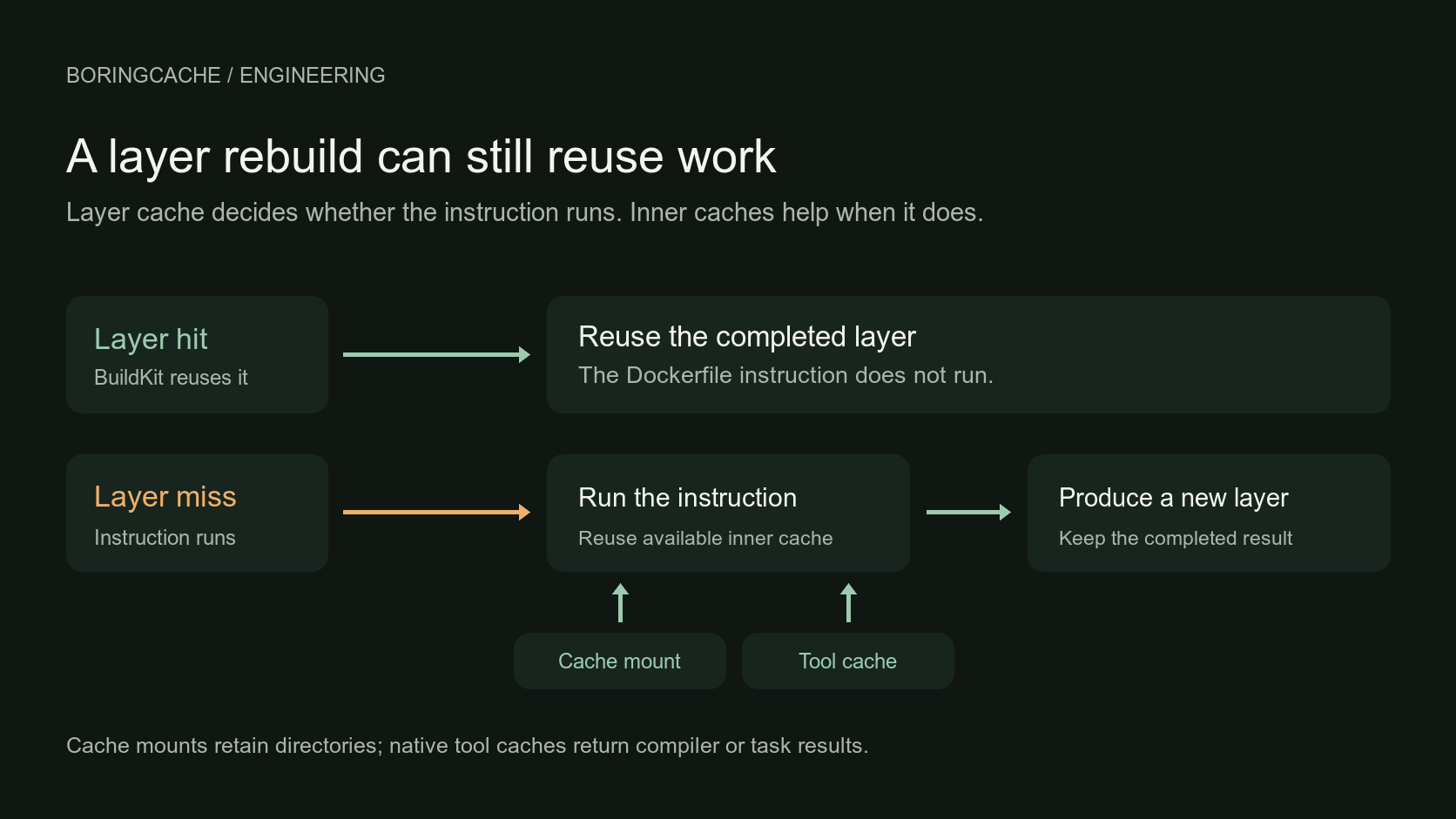
When a Docker layer hits, BuildKit skips the instruction and uses the result it already has. When it misses, the command runs again. Later layers that depend on it may have to run again too. That is the correct behaviour, and Docker's cache invalidation guide explains the rules in detail. That is usually fine for a quick command. It becomes more noticeable when one instruction contains most of the build time:
RUN cargo build --release --locked
Cargo is one example. The same thing happens when a build compiles FFmpeg, libvips or another C library, or when Gradle runs a large task graph. A source or build-file change may correctly invalidate the Docker layer. That does not mean every compiler result or build-task output inside the command has become useless. If the command takes a few seconds, I would let it run. If it takes five or ten minutes, the work inside it becomes worth looking at separately.
The first attempt invalidated the layer
I already had the BoringCache archive commands, so my first attempt was to put the CLI inside the Dockerfile and restore a cache around the slow command. It worked, but every new BoringCache release changed the binary in the Dockerfile. That changed the layer key and made the dependent layers rebuild. I was trying to preserve a smaller unit of work while invalidating the larger Docker layer cache. I wrote about that experiment in Docker build done. Still exporting cache…. What I needed here was a way to work with BuildKit without making BoringCache part of the image or its layer keys.
Layer, mount and tool caches
I had been treating Docker cache as one thing. It helped to separate three different questions.
- Docker layer cache
- Can BuildKit skip this instruction and reuse its complete filesystem result?
- BuildKit cache mount
- When the instruction runs, can a directory such as Cargo
target/or a package-manager store keep useful state from an earlier build? - Native tool cache
- When the tool asks for a particular compiler invocation or task result, can sccache, ccache, Gradle or another supported protocol serve it?
The layer cache is still the first thing I want to hit. The other two matter after BuildKit decides that the command has to run.
Cache mounts stay with the builder
BuildKit cache mounts already let a RUN reuse a mutable directory between invocations on the same builder. That works very well on a persistent machine because the directory is already there. An ephemeral runner loses that builder when the job ends. BuildKit's mount contents are also not included in its exported layer cache, so the next fresh builder cannot recover them through ordinary cache-to and cache-from alone. --mount-cache makes selected BuildKit cache mounts portable. BuildKit already keeps them on one persistent builder; BoringCache makes them available to the next one. You keep the normal RUN --mount=type=cache in the Dockerfile.
Tool caches inside the build
The other part was the cache protocol the tool already understands. sccache and ccache can reuse compiler results. Gradle, Nx, Turbo, Maven, Bazel and Go can ask for their own build or task results. They work in smaller units than a Docker layer because the tool asks for the exact work it needs while the command is running. For Rust, target state and sccache solve different parts of the build. Rust build cache is three caches, not one goes into that in more detail.
$ boringcache docker --mount-cache --tool-cache sccache
The Docker adapter starts the selected tool cache beside the build and injects its settings only while the build is running. The credentials stay out of the Dockerfile, layer keys and final image. BuildKit still checks the layer. Cargo still checks freshness. sccache still makes the compiler key. BoringCache makes the reusable data available where those tools expect it.
Three tests
I did not want to add more cache options just because they sounded useful. I wanted to answer three smaller questions.
Can the build stay warm with layers off?
I wanted to know whether the inner caches saved build time when Docker could not skip the instructions through layer reuse. Mastodon was a useful test because its image builds Ruby and frontend assets, and it also compiles libvips and FFmpeg. In one paired run I disabled Docker layer reuse for the inner-cache lane. The mount caches still restored package state, and ccache served the native compilation. The upstream control also had layer reuse disabled, but no portable mount or compiler cache.
linux/amd64
  upstream cache:false                 8m56s
  no layers + ccache + mount caches    3m11s
  ccache                               2,216 / 2,412 hits

linux/arm64
  upstream cache:false                 6m20s
  no layers + ccache + mount caches    2m14s
Those are provider-step times from the Mastodon run, not a promise for every Dockerfile. Every Docker instruction was allowed to run, and the native compilation still reused cached results.
Do inner caches replace the layer cache?
The Immich base images answered that question. The run built four cells: dev and prod images on AMD64 and ARM64. The optimized BoringCache lane used layers, ccache and mount caches. Then I repeated the same rebuild with Docker layers disabled but kept ccache and the mounts.
layers + ccache + mounts         24m40s
no layers + ccache + mounts      29m45s   · 21% slower
GHCR registry cache              39m14s   · no-layer lane 24% faster
The no-layer lane did not beat a warm layer cache, and I would not expect it to. It came within about five minutes across the four build cells, and it finished roughly nine and a half minutes ahead of the registry-cache run. You can see all four cells in the public comparison run. Final-image push was disabled in all three lanes. Those results showed me when inner caches helped. Inner caches were not a replacement for Docker layers. They let tools reuse cached results when a valid change made the layer miss.
Does this work beyond compiler caches?
The idea is not limited to compiler caches. Gradle can reuse task outputs too. In a Stirling-PDF run, the Docker adapter started a Gradle cache beside the build:
$ boringcache docker --tool-cache gradle:stirling-gradle --     docker buildx build ...

> Task :compileRestartHelper FROM-CACHE
> Task :common:compileJava FROM-CACHE
> Task :proprietary:compileJava FROM-CACHE
> Task :stirling-pdf:compileJava FROM-CACHE

27 actionable tasks: 21 executed, 4 from cache, 2 up-to-date
The public ultra-lite image job shows Gradle answering from cache inside Docker. Twenty-one tasks still executed, and the rest of the image still had to build.
Measure cache mounts
I would check the complete build time before enabling a cache mount. A cache mount takes time to restore and, on a trusted build, time to save again. If the command can recreate the directory in a few seconds, moving it over the network may be slower than doing the work. I found that with small package-manager caches. Some were technically reusable but did not improve the complete build, so they stay off by default. Moving a mount between builders makes more sense when rebuilding the directory would take minutes: a large Cargo target, an expensive native build or another workload where measurements show that restoring takes less time.
Tool-cache hits also remove only the work performed by that tool. ccache does not remove configure or link time. sccache does not stop Cargo resolving dependencies. Gradle may restore some tasks and still execute many others. A hit count is useful evidence, but the overall build time is still the number that matters.
Layer cache stays on
I started this because BoringCache's own musl builds were slow inside Docker. I did not need to replace Docker's layer cache. I needed to stop treating the layer as the only reusable unit in the build. The normal path is still simple: keep the BuildKit layer cache on, add a portable mount when a directory takes long enough to rebuild, and add a native tool cache when its hits reduce total build time. But when the layer has to run again, cached results from the tools inside it can still be reused.