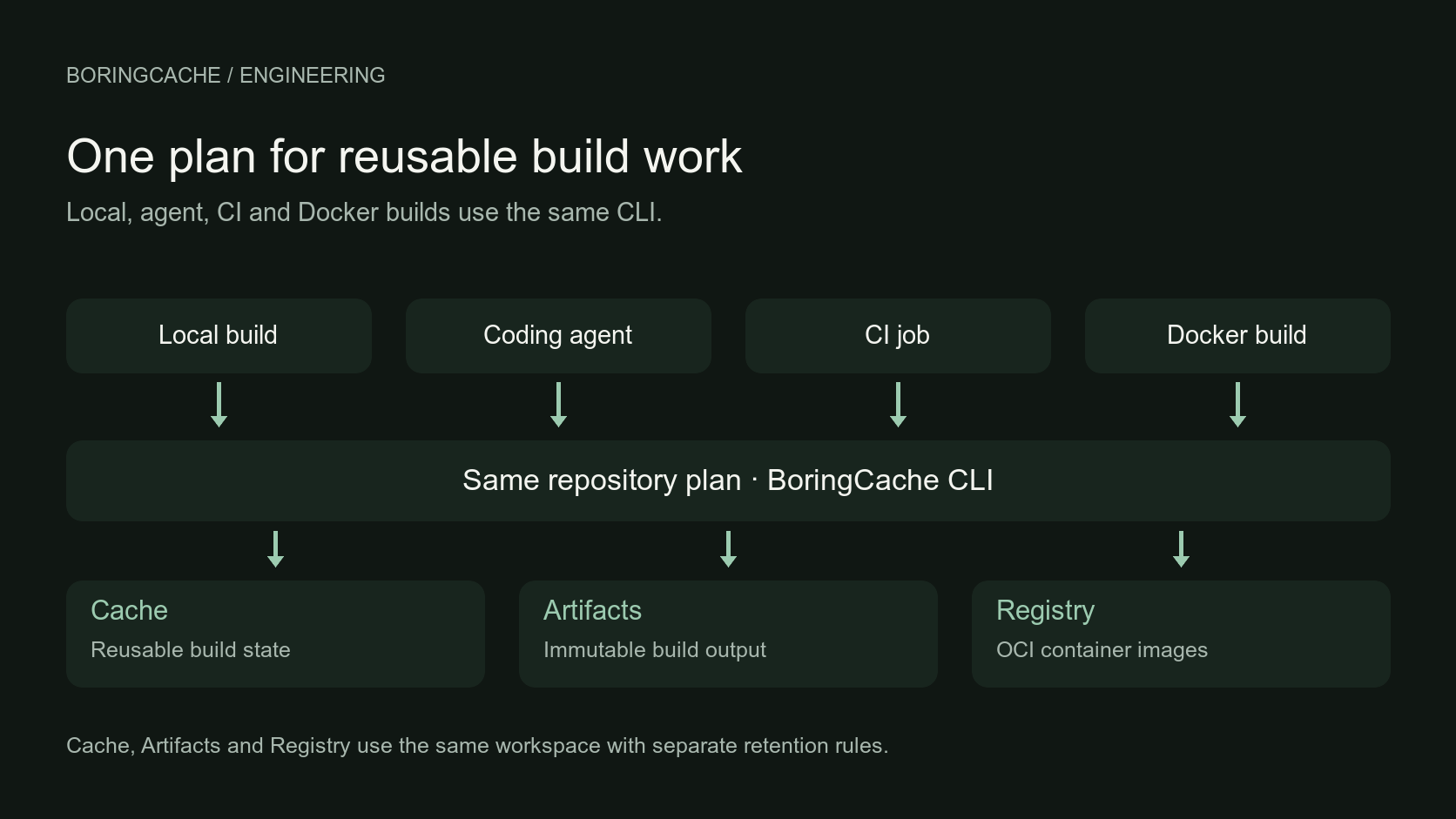
Today I am introducing BoringCache. I have been working on it since July 2025, starting from a problem that kept bothering me: CI and developer machines were doing work that another machine had already finished, but there was no simple way to reuse it. BoringCache is a shared build cache for local development, coding agents, CI and Docker. A repository has one plan, and the same CLI can apply that plan wherever the build happens. The build stays where it is. Other machines can reuse the cached state and build outputs.
I think of it as shared storage for build state and output. It does not try to become Cargo, BuildKit, Nx or a runner. It keeps useful state and finished output from those systems available for the next compatible machine. I have already written about why I built BoringCache: the old MacBook Air, the Ruby compile and the frustration of watching another machine build the same thing again. This post is about what that first idea became and how the product works today.
It started with cache
The first product was Cache. I wanted a repository to reuse directories, native tool results and Docker or BuildKit state without limiting reuse to one runner or CI provider. Cache had mostly been developed as part of the CI provider, and I can see why. The provider already owned the runner and nearby storage, and moving large build data outside that boundary could add cost. But it also made cache a feature of one build environment rather than something the repository could use everywhere. A long-lived developer machine already had cached build state on disk, so that boundary was easy to ignore. Fresh CI runners, Docker builders and coding-agent worktrees made it more obvious: each environment had a cache, but other environments rarely reused its state.
Artifacts and Registry came later. I did not start with a plan to make a suite. But by then BoringCache already had workspace permissions, content verification, storage and a CLI that could move data where the build needed it. The same pieces were useful for finished output too. Cache, Artifacts and Registry needed different storage and retention rules. Cache can be reclaimed because the build can produce it again. An Artifact is something you chose to keep. Registry stores images using the OCI model that Docker already understands. They use the same account and workspace, but each keeps its own retention and cleanup rules.
Start with the repository
The whole thing still starts with one command, run from a Git repository:
$ cd shop
$ boringcache onboard
onboard signs in, selects or creates a workspace, looks for useful cache state and can write a .boringcache.toml file. Workflow changes are optional and skipped by default. I wanted the cache plan to stay with the repository instead of being defined only in one CI provider's workflow. A small mixed project might have a plan like this:
workspace = "acme/shop"

[entries.bundler]
tag = "bundler-gems"

[profiles.bundle-install]
entries = ["bundler"]

[entries.node-modules]
tag = "node-modules"
path = "node_modules"

[profiles.npm-install]
entries = ["node-modules"]

[adapters.cargo]
tag = "rust-build"
command = ["cargo", "build", "--release"]

[adapters.docker]
tag = "docker-main"
command = ["docker", "buildx", "build", "."]
That plan gives the project four commands:
$ boringcache run --profile bundle-install -- bundle install
$ boringcache run --profile npm-install -- npm ci
$ boringcache cargo
$ boringcache docker
The same commands work in a local shell and on a runner. boringcache/one uses the same plan in GitHub Actions; another CI system can call the CLI directly. A coding-agent sandbox can restore with a read-only token. A Docker build can use the Docker cache and selected inner tool caches. You do not need a new cache setup for each place the build happens. The repository plan can be the same everywhere, but that does not make every cached file portable. A Linux binary does not become portable because it is in shared storage, and Cargo must check restored Rust outputs against the current compiler and build inputs. The Cargo target tag retains the configured platform and Git scope while Cargo decides what needs rebuilding.
Three kinds of cache
Cargo should still decide which Rust crates are fresh. BuildKit should still decide which Docker layers are valid. Nx, Turbo, Gradle, Maven and Bazel should still own their task graphs and cache keys. BoringCache gives those tools shared storage and handles the restore and publish steps around them. In practice, there are three kinds of cache.
- Archive and build state
- Directories that need to move between machines. The example uses Bundler and npm, but archive entries are not tied to either package manager. You can point one at the package-manager or build directory your project needs. Cargo target-state restore also preserves the freshness information Cargo needs.
- Native tool caches
- Protocols the tool already understands. That includes compiler caches such as sccache and ccache, task caches such as Nx and Turbo, and remote caches for Gradle, Maven, Go, Bazel, Nix and Xcode. The tool decides the identity of the work; BoringCache stores and serves the result.
- Docker and BuildKit cache
- Reusable layers, BuildKit cache mounts and native tool caches inside a build. A Rust compile inside Docker can use target-state mount caching and sccache instead of depending only on the surrounding Docker layer.
I wrote about that combination in Rust build cache is three caches, not one, and about the Docker side in Docker build done. Still exporting cache….
Store the content once
Tags tell BoringCache which cache you want. Underneath, the data is content-addressed. If two cache entries in a workspace contain the same blob, BoringCache can store that blob once and let both entries refer to it. Large archives are split into content-defined chunks as well. A small change does not automatically mean uploading the whole directory again. In one measured Cargo target update, 96.9% of a changed 24.7 GB target was reused and only 97.6 MB of new content had to be sent. BoringCache still had to walk the directory, but there was much less to upload. Reuse stays inside the workspace. BoringCache does not deduplicate data across unrelated customers.
Managed storage or your own bucket
Managed storage is ready by default for Cache, Artifacts and Registry, and BoringCache does not add an egress fee. On the Custom plan, Cache and Artifacts can instead use a supported S3-compatible bucket, including Amazon S3, Cloudflare R2, Google Cloud Storage, MinIO and other documented providers. This is useful if you want the build data to stay in your own storage account. The CLI receives short-lived URLs for the objects it needs, not your bucket-wide credential.
Object storage holds the data. BoringCache tracks which workspace the data belongs to, who can access it, its tags and its build activity. That is what lets you see what restored, missed or published instead of having to infer that activity from the stored objects alone. Registry storage stays managed by BoringCache and separate from the workspace's Cache and Artifact storage. A BYOC provider can still charge its own storage, request or egress fees.
Cache trust policy
Sharing cache between machines requires deciding which jobs can restore it and which jobs can replace it. BoringCache separates restore, stage, save and admin permissions. A pull request or coding-agent sandbox can restore useful work without receiving the credential that publishes the next cache. Trusted main, tag or release jobs can publish. The CLI verifies content digests, and the official BoringCache Action requires signed server responses by default. This is how the normal setup works. The GitHub Actions trust guide shows the two tokens in a real workflow.
CI artifacts
Not every CI output should be treated as cache. A cache is reusable state. It saves work, but it can expire or be reclaimed. A release binary, test report or deployment package is an Artifact. It gets an immutable art_... ID and its own retention. Cache cleanup cannot remove it.
$ boringcache artifact push dist/ --name release-linux
$ boringcache artifact list
$ boringcache artifact pull art_0123456789abcdef01234567 ./release
OCI Registry
Container images are different again. BoringCache includes a private OCI Registry. The same Docker build can use reusable BuildKit cache and publish the image you will deploy.
$ boringcache docker --publish-image web:$GITHUB_SHA -- \
    docker buildx build .

$ docker pull registry.boringcache.com/acme/shop/web:$GITHUB_SHA
You build through boringcache docker, publish with --publish-image, and pull the result with the normal Docker or OCI client. The cache speeds up the build; the Registry keeps the finished image, so deployment can pull the exact image CI built instead of building it again.
BoringCache builds BoringCache
BoringCache uses most of these features for its own builds. The control plane is Ruby on Rails. The CLI is Rust. There is a GitHub Action, and the Docker backend works with BuildKit. The build cache overview shows which work each tool can reuse. I use BoringCache locally, in CI and in deployment builds. The Rust CLI uses Cargo target state and sccache together. Rails dependencies use archive profiles. Docker builds use the managed backend and can reuse cache mounts and tool caches inside the build. Release outputs can be kept as Artifacts, and deployable images can go to the Registry.
Using it this way is how I find the awkward parts. It is also why I try to keep the normal interface small: one onboard command, one repository plan and commands named after the tool you already use.
Give it a try
I have been using BoringCache this way for the last year. It is ready for other people to use now. The Free plan includes 30 GB of cache, 10 GB of private Registry storage and 10 GB of Artifact storage, plus 500,000 build-storage requests shared across all three products each month. It does not require a credit card. I would start with the cache for the build step you spend the most time waiting for: a Rust build, a Docker build, a large dependency install or a task cache that disappears with every fresh runner.
$ cd your-project
$ boringcache onboard
The quick start takes you through the setup, the adapter guides show the supported tools, and the benchmarks link to the exact public runs behind published performance examples. If you try it, I would like to hear which parts of setup are simple and which still require too much manual configuration. I do not want you to think about cache any more than you need to. I want the reusable build state to be there the next time somebody needs it.